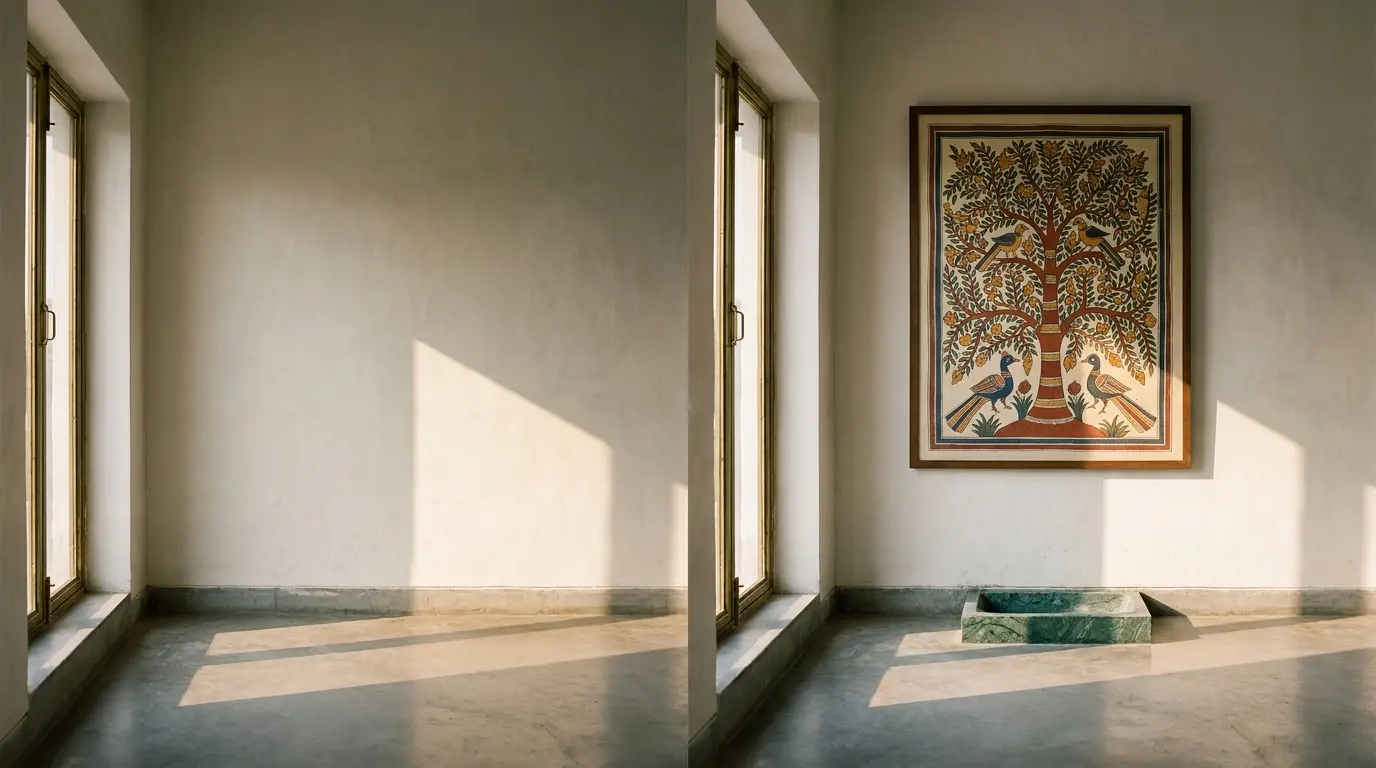
A buyer in Bangalore sent us a photograph one Tuesday morning. A tall, slightly under-lit corner of her drawing room — lime-plastered wall, polished concrete floor, a brass-framed window throwing late morning light across the floor at a sharp angle. She had been looking at our Madhubani Tree of Life panel and she wanted to see what it would look like on that wall. Can you put it on, just for me to see?
We can, and that is what the visualiser is. But it is worth being honest about what we actually do when we put it on — and, equally, about what we do not do, because the difference matters.
What we do
When your photograph arrives, the first thing we do is look at it as a room, not as an image. We ask three questions before any rendering begins. What is the dominant light source? — usually a window, sometimes a ceiling fixture, often both. What is the colour temperature of that light? — afternoon sun in Bangalore is closer to 5500K, while a warm interior bulb is closer to 2800K, and the marble or paper or pigment will look different under each. What is the scale of the room? — we use the height of a switchboard, a doorframe, or a piece of furniture you have included to work out roughly how tall the wall is and how big the piece will read against it.
Then we composite the chosen piece into the photograph. We scale it correctly — a 90 cm wide painting on a 280 cm wall is not the same as a 90 cm painting on a 220 cm wall, and we want you to see the difference. We match the colour cast of the room — if the light is warm, we shift the piece's whites and creams accordingly, so the rendering looks like an honest photograph rather than a magazine paste-in. We add a soft natural shadow under or behind the piece, in the direction the room's own shadows are falling, because nothing breaks the spell of a render faster than a piece that appears to be floating.
The whole process, end to end, takes us between two and four hours of careful work. We do it by hand, in Photoshop, in our own studio. We do not use a stock visualiser app or an AI room-staging tool. We have tried both and neither matches what one of our designers can do with an hour and a calibrated screen.
What we do not do
This is the part of the conversation that gets shorter shrift in our industry, and we want to be specific about it. There are several things the visualiser cannot, and should not, claim to do.
It cannot predict how the marble will weather in five years. Marble is a living stone — it picks up oils from your hands, slight discolourations from a coffee ring, the soft polish of being walked past every day. A Makrana counter in your kitchen will look different in 2031 than it does on the day it is installed, and that is part of what you are buying. A render is a snapshot of day one. It cannot show you day eighteen-hundred.
It cannot account for changes you have not yet made. If you tell us the wall is going to be repainted, we can render the new colour. If you tell us the floor is going to be redone, we can render the new floor. But the visualiser is only as honest as the photograph and the brief — if there is a fan we did not see, or a curtain you forgot to mention, or a wardrobe arriving next month, those will not be in the render and they will, in real life, change how the piece sits.
And — most importantly — it cannot render the exact veining of the slab you will receive, because every slab is unique. When we render a Calacatta dining table into your room, we use a representative photograph of Calacatta from a slab we have on hand or have recently seen. Your slab, when it is allocated, will have its own veining — sometimes more dramatic, sometimes quieter, always its own. We send you a photograph of your specific slab before any cutting begins, and that photograph is the one to trust, not the render.
The visualiser is a commitment device, not a fantasy
This is the way we think about it internally. The visualiser is not there to make a piece look better than it is. It is there to make sure that when you commit to an eight-week build, you have already seen the room with the piece in it, and you are not committing on faith.
Plenty of buyers walk away after seeing the render. The piece is too big. The piece is too small. The colour fights the floor. The wall is not as empty as they thought. We consider these the most useful renders we do, even though they end the commission. A render that prevents a wrong piece from being built is worth more than a render that confirms a right one.
What we want is for you to see the room with the piece in it, honestly, before any chalk goes on stone. If it works, you proceed with confidence. If it does not, you save us both eight weeks and a serious amount of money.
How to send a useful photograph
A few things help. Stand straight on, not at an angle, so the wall is square in frame. Photograph in daylight if you can — and if daylight is not possible, switch on every light in the room. Include a scale reference — a chair, a doorframe — so we can work out dimensions. Hold the phone at chest height, not eye level, because eye-level photographs distort a room's geometry. Send the original from your camera roll, not a screenshot, because compression strips out the colour data we need.
A useful photograph takes thirty seconds. The render it produces is honest for as long as the room stays the same. We think that is a fair exchange for the eight weeks that follow.